If your Search Console graph looks like it fell down a flight of stairs sometime between late September and now, you’re in crowded company. Google has been unusually busy this year. Four spam updates since March. Two core updates. And a stretch of unconfirmed ranking turbulence through October that has had SEO forums buzzing almost every other day.
The problem is that “Google updated something and my traffic dropped” isn’t a diagnosis. Plenty of drops in this window have nothing to do with an algorithm at all. And the ones that do need very different fixes depending on whether Google has a problem with a handful of pages or with your whole site.
This guide walks through exactly how I check that, using Search Console data you already have. Then it covers what recovery actually looks like in late 2026, including the guidance Google has quietly added in the last few weeks.
What Google actually released in September and October 2026
Let’s get the facts straight first, because a lot of what’s circulating online is guesswork dressed up as confirmation.
| Date | What happened | Confirmed by Google? |
| 18–21 Aug 2026 | August 2026 spam update (rolled out in under three days) | Yes |
| 4 Sept (reverted ~13 Sept) | Ranking shift that appeared to roll back about nine days later | No |
| 15 Sept | Volatility spike reported by tracking tools | No |
| 24 Sept – 8 Oct 2026 | September 2026 spam update. Waves of impact around 25–27 Sept, 30 Sept–1 Oct and 4–6 Oct | Yes |
| 16 Oct | Volatility; some sites that vanished earlier returned | No |
| 20–21 Oct | Heavy volatility across 15+ rank trackers | No |
| 24 Oct and 27 Oct | Further volatility spikes and heavy industry chatter | No |
A few things stand out. The September spam update was the fourth of 2026, following March, June and August. Google said it might take up to two weeks, and it did: it started on 24 September and wrapped up on 8 October. That’s a big change from the earlier 2026 spam updates, none of which ran past three days. Google called it a “normal spam update” and, as with August, said it wasn’t aimed at link spam.
As for October, there’s no confirmed October update as of writing. The last broad core update was May 2026 (21 May to 2 June). Everything you’ve read about an “October core update” refers to unconfirmed volatility. It may be real ranking movement. It may be testing. It may be the run-up to the next core update, which on historical timing is overdue. But you can’t tie a drop to a named update that doesn’t exist, so be careful with what you tell clients or your boss.
Reality check: if your drop started on 20 or 27 October, you’re looking at unconfirmed volatility, and the right move for now is usually to watch and document, not to start rewriting pages.
Step 1: Rule out the boring explanations first
I’ve lost count of the “we got hit by the update” panics that turned out to be a broken tag, a robots.txt change or a public holiday. Spend fifteen minutes here before you go anywhere near content.
Is the data even complete?
Search Console data runs two to three days behind. A cliff on the last two days of the graph is very often just data that hasn’t landed yet. Google’s page indexing report has been slow lately too, and John Mueller has publicly told people not to burn energy on how fresh it is.
Is it a tracking problem?
If GA4 shows a drop but Search Console clicks are flat, the problem is your analytics, not Google. Check for a consent banner change, a GTM container that got edited, or a site rebuild that dropped the tag.
Is it technical?
Open the Pages (indexing) report and look for a jump in “Excluded by noindex”, “Not found (404)” or “Blocked by robots.txt” that lines up with your drop. Run URL Inspection on two or three of your biggest pages. Check that your robots.txt and canonical tags haven’t changed. A site migration, a theme update or a plugin that flipped noindex on can look exactly like an algorithm hit.
Is it the SERP, not your rankings?
This one catches a lot of people in 2026. AI Overviews now appear on more than 80% of Google searches, according to recent data from Semrush, SE Ranking and seoClarity. Some site owners in the October volatility reported better rankings but 60–70% fewer clicks. If your average position held steady and impressions held steady but clicks fell, Google didn’t demote you. The results page changed around you.
Also remember that Google stopped serving 100 results per page back in September 2025. That changed how impressions and deep rankings get counted, so year-on-year comparisons that straddle that date are distorted.
Is there a manual action or security issue?
Check Security & Manual actions in Search Console. There were reports in early October that Google may be issuing more manual actions than usual. A manual action comes with a notice. A spam update does not. If you have a notice, you’re on a different recovery path (covered below).
Step 2: Line your drop up against the update dates
Open Performance → Search results, set the date range to the last 3 months and switch the graph to daily. Turn on clicks, impressions and average position together.
Now find the exact day the drop started. Not the week. The day. Then compare it with the table above.
- A step down that starts 18–21 August points at the August spam update.
- A step down on 25–27 September, 30 September–1 October or 4–6 October lines up with the waves of the September spam update.
- A drop that starts on 16, 20–21, 24 or 27 October sits in the unconfirmed volatility window.
- A gradual slide over weeks with no clear start date usually isn’t an update at all. Think competition, content decay, seasonality or SERP features.
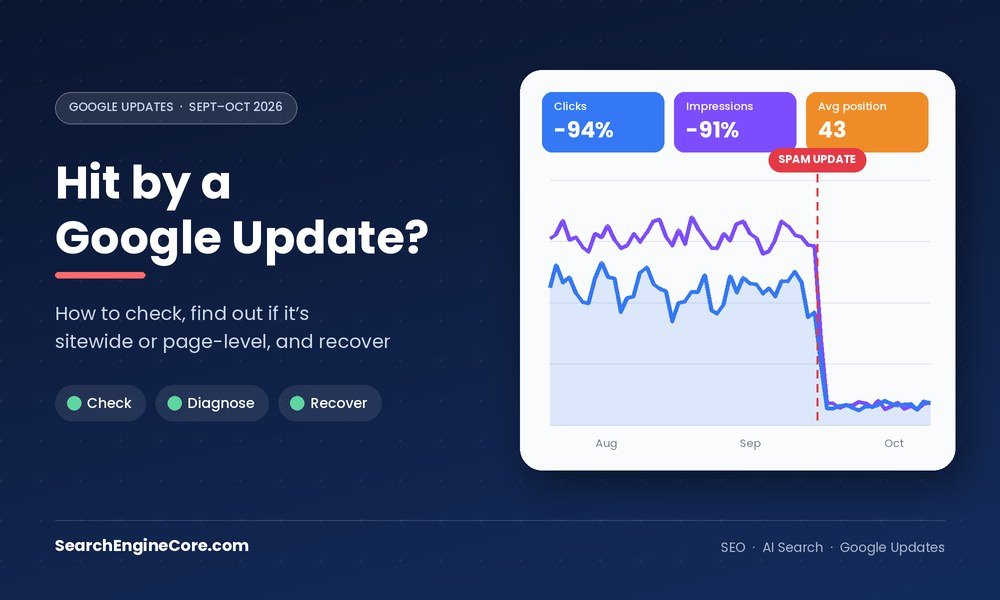
Spam-update hits tend to look brutal. Clicks and impressions fall off a ledge within a day or two and stay there. If your line wobbles down 10% and wobbles back, that’s noise.
One more pattern worth knowing about. Glenn Gabe reported that some sites already hit in August lost even more during the September rollout. So if you were hit twice, that’s consistent with the same problem being caught again, not with two separate problems.
Step 3: Work out whether the hit is sitewide or on specific pages
This is the most important part of the whole diagnosis, because it decides what you fix.
Google has been clear in its ranking systems documentation that its systems mostly work page by page, but that it also uses site-wide signals and classifiers. Good site-wide signals won’t make every page rank. Poor ones won’t sink every page. In practice, though, spam systems are where site-level effects show up most dramatically. When a classifier decides a site’s main purpose is manipulating search, the damage tends to spread well beyond the offending pages.
Here’s how to tell which one you’re dealing with.
1. Compare equal before-and-after windows
In Performance, click the date filter, choose Compare, and pick two windows of the same length that start on the same weekday. For the September update, I’d use 10–23 September (before) against 8–21 October (after the rollout finished). For August, use the two weeks before 18 August against 22 August to 4 September.
Don’t compare against windows that sit in the middle of a rollout. You’ll be measuring a moving target.
2. Look at the Pages tab, then export it
Switch to the Pages tab and export both windows. In a spreadsheet, calculate the change in clicks and impressions for every URL. Then add a column that groups each URL by section or template: /blog/, /services/, /locations/, product pages, tag pages, and so on.
Now look at how the loss is spread.
- If one or two groups lost 80–100% while the rest held or grew, you have a page-level or template-level issue
- If every group lost a similar, heavy share, including your strongest and most legitimate pages, you’re looking at a sitewide
3. Split brand from non-brand
In the Queries tab, add a filter: Query → Custom (regex) and enter your brand variants, for example (?i)acme|acme plumbing|acmeplumbing. Run it with “Matches regex” and then with “Doesn’t match regex”.
Brand traffic usually survives a page-level hit. If people searching your business name can’t find you any more, that’s a strong sitewide signal. In October, Glenn Gabe documented two health and finance sites that disappeared even for their own brand names before coming back around 16 October. That’s about as sitewide as it gets.
4. Filter by folder with regex
Use Page → Custom (regex) to isolate sections, for example /blog/ or ^https://www.example.com/locations/. Compare each section’s graph against the update dates. This is quicker than the spreadsheet when you already suspect one section.
5. Check your homepage and best pages
Pick three pages you’d happily show Google’s own quality raters: your homepage, a strong service page, your best piece of original content. Did they drop too? Search their exact titles in Google. If a genuinely good page has fallen for its own title, the problem isn’t that page.
6. Look at position, not just clicks
A page that went from position 4 to position 9 lost rankings. A page that went from position 4 to no impressions at all was filtered out. Sitewide spam hits tend to produce the second pattern across lots of unrelated pages at once.
Reading the results
| What you see | What it usually means | Where to focus |
| One template or folder down 80%+, rest stable | Page-level: that page type tripped a spam or quality signal | Fix, consolidate or remove that page type |
| Every section down heavily, brand queries down too | Sitewide classifier or manual action | Find the pattern that defines the site as spam |
| Clicks down, positions and impressions stable | SERP change (AI Overviews, new features) | CTR, snippets, AI visibility, not penalties |
| Impressions down, positions stable | Less search demand or seasonality | Check Google Trends, last year’s data |
| Drop lines up with a deploy, not an update | Technical issue | Indexing report, robots, canonicals, redirects |
| Slow decline over 2–3 months | Competition or content decay | Content refresh and competitor review |
Step 4: Spam update, core update, manual action or something else?
These get mixed up constantly, and they need different fixes.
| Spam update | Core update | Manual action | |
| What it is | Automated spam detection (SpamBrain) gets better at catching policy violations | Google reassesses relevance and quality across the web | A human reviewer at Google acts on your site |
| Notice in Search Console? | No | No | Yes |
| Typical shape | Sharp cliff within days | Gradual shift over the rollout, often partial | Sharp drop when applied |
| Fix | Remove the violating pattern, then wait | Improve overall quality and usefulness | Fix, then file a reconsideration request |
| Recovery time | Months; depends on Google re-evaluating the site | Often the next core update | After a successful reconsideration |
A useful detail from Google’s spam documentation: when a link spam update neutralises links, whatever ranking benefit those links gave you is gone for good. That’s why “recovering” from a link spam hit rarely means getting back to where you were. The August and September 2026 updates weren’t link spam updates, though, so disavow files aren’t the answer here.
What the 2026 spam updates seem to be hitting
Google never publishes a list of targets, and it hasn’t for these updates either. What follows comes from SEOs who analysed affected sites, so treat it as strong evidence rather than confirmation.
Scaled content is the big one. Across both August and September, the sites reported as hit were heavy on mass-produced pages: AI content published at volume, programmatic pages built from one template, and thin affiliate sites. One example that did the rounds was a site with a near-identical page for every phone area code. According to recaps of Google’s Search Central Live event in Europe, Google now sees scaled content as a bigger problem than link spam, and says it’s using AI to catch more of it.
List and resource pages built for SEO traffic sit in the same bucket. Think “500 free guest posting sites” or “top directory submission sites 2026”: recycled lists that exist to rank, not to help. They often attract decent traffic right up until the day they don’t.
Location and doorway pages. Hundreds of suburb or city pages with the same copy and a swapped place name.
User-generated and hacked spam. Open comment sections, forums and profile pages that spammers fill without anyone noticing. Run site:yourdomain.com casino or site:yourdomain.com crypto to see if anything’s lurking.
What Google has added to its guidance recently
Google doesn’t usually announce new rules alongside a spam update. But several of its help documents changed around the September rollout, and they tell you a lot about where enforcement is heading.
- AI content needs human review. In early October, Google refined its people-first content guidance to say that AI-generated text published without manual scrutiny shows little effort. Its AI content guidance now explicitly calls for fact-checking and review before publishing.
- Fake authors are called out. The helpful content guidance now warns specifically against fabricated author profiles. If your “expert” bylines belong to people who don’t exist, fix that.
- UGC spam covers more tools. Google updated its guidance on preventing user-generated spam to cover tools that let users publish shared pages, generated content or web apps. If your platform lets users create public pages, you’re responsible for moderating them.
- Spam policies include gaming AI answers. Back in May, Google clarified that trying to manipulate its generative AI responses falls under the spam policies too. Some SEOs believe the run of 2026 spam updates is partly about people gaming AI Overviews.
Step 5: How to recover
Your path depends on what Step 3 told you.
If the hit is page-level
This is the better news. Google has decided that a type of page isn’t worth showing, but it still trusts the rest of the site.
- List every URL in the affected group. All of them, not only the ones that lost the most traffic.
- For each page, decide one thing: improve it substantially, merge it into a stronger page with a 301 redirect, or remove it (410 or noindex). One strong page beats five thin ones.
- Improving means adding something that couldn’t exist without real experience: your own data, process detail, photos, worked examples, real constraints. Swapping synonyms or refreshing the year in the title doesn’t count.
- Leave the healthy sections alone. Rewriting pages that weren’t the problem is the most expensive mistake people make after an update.
- Log every change with its date so you can match it against Search Console later.
If the hit is sitewide
This is harder, and you need to be honest with yourself about the site’s main purpose. Ask the question Google’s systems are effectively asking: does this site exist to help an audience, or to collect search traffic?
- Find the pattern. Sitewide spam hits almost always trace back to one thing done at scale: hundreds of programmatic pages, a large AI-written section, a block of thin affiliate content, a hosted third-party section, or a pile of SEO list posts.
- Remove it properly. If it can’t be made genuinely useful, take it out of the index. Partial fixes rarely move a site-level classifier. You’re trying to change what the site is, on balance.
- Strengthen what’s left. Make sure the remaining content has real authors, real expertise and a reason to exist. Add original research, case studies and first-hand experience.
- Close the doors. Moderate comments, lock down user registrations, audit plugins and check for hacked pages and injected links.
- Don’t try to dodge it. Moving the content to a new domain or subdomain to escape the classifier is itself against Google’s spam policies, and sites that keep violating them can be removed from search entirely.
If you have a manual action
Read the notice carefully, since it tells you which policy you broke and sometimes gives example URLs. Fix every instance across the site, not only the examples. Then file a reconsideration request explaining what you found, what you changed and how you’ll stop it happening again. Be specific. Vague requests get rejected.
If your drop is from the October volatility
Hold off on big changes. Document the drop, annotate the dates, and keep watching for two to three weeks. If it reverses, as the early September shift did, you’ve lost nothing. If it sticks and a core update gets confirmed, you’ll be working from clean data instead of guesses.
How long recovery actually takes
Google’s own spam update documentation puts recovery at a period of months, and gives no shortcut. The reason is simple: Google has to re-evaluate the site, and that happens as its systems run and refresh, not when you hit publish on your fixes.
There is one encouraging pattern from this year. Glenn Gabe documented several sites hit by earlier 2026 spam updates that surged during the September rollout. One went from close to zero to roughly 8,000 clicks a day. So recovery can arrive with a later update, provided the problem has genuinely been fixed by then.
What that means in practice: do the cleanup properly and early, keep publishing genuinely useful work, and expect the payoff around a future update, not next week. If you’re reporting to a client, set that expectation in writing now.
What not to do
- Don’t disavow links in response to a spam update that wasn’t a link spam update.
- Don’t mass-delete content that’s actually good because traffic fell across the site.
- Don’t change publish dates or add “2026” to titles hoping for a freshness bump.
- Don’t run your thin pages through another AI tool and republish them. That’s the same problem with a new coat of paint.
- Don’t judge recovery from data pulled mid-rollout. Wait until the update is marked complete, then give it at least another week.
- Don’t act on unverified lists of “what this update targeted” as if they came from Google.
Quick diagnosis checklist
- Confirm the drop in Search Console, not just GA4 or a rank tracker.
- Rule out data delay, tracking, technical and indexing problems.
- Check Manual actions and Security issues.
- Pin down the exact start date and match it against confirmed update dates.
- Compare equal before-and-after windows with Compare mode.
- Export the Pages tab and group URLs by section or template.
- Split brand and non-brand queries with regex.
- Check whether your best pages and homepage dropped.
- Decide: page-level, sitewide, SERP change, or technical.
- Fix the pattern, log every change with dates, and set a monthly review.
FAQs
Was there a Google core update in September or October 2026?
No. September had a spam update (24 September to 8 October). October has had several rounds of unconfirmed volatility, but Google hasn’t announced a core update since May 2026.
Does Google penalise AI-generated content?
Not for being AI-generated. It targets content produced at scale mainly to manipulate rankings, however it was made. That said, Google’s updated guidance now expects AI-assisted content to be reviewed and fact-checked by a person before it goes live.
My rankings look fine, but clicks have dropped. Was I hit?
Probably not by a spam update. Check whether AI Overviews or other features now sit above your result for your main queries. That’s a click-through problem, and it needs a different strategy.
Can I recover before the next spam update?
Sometimes partially, as Google’s systems re-evaluate your site. But most meaningful recoveries this year have shown up around later updates, and Google itself talks in months.
Should I file a reconsideration request after a spam update?
Only if you have a manual action. Reconsideration requests apply to manual actions, not to algorithmic spam updates.
Sources
- Search Engine Land — Google September 2026 spam update done rolling out
- Search Engine Roundtable — September 2026 spam update done
- Search Engine Roundtable — Phase two of the September 2026 spam update
- Search Engine Land — August 2026 spam update done rolling out
- Search Engine Journal — Google page-level and site-wide signals both matter
- TechJuice — Ranking volatility on 20 and 21 October 2026
- Search Engine Roundtable — Daily recap, 27 October 2026
- Distribb — September 2026 spam update: what got hit, what came back
- Obrofy — Google’s September 2026 spam update is done
- Optimixed — Google updates its user-generated spam guidance
- Coalition Technologies — Will a core update follow the September spam update?

Sanjeev Kumar is a digital marketing expert with over 14 years of experience in SEO, PPC, content marketing, and online growth strategies. He specializes in search engine optimization, AI-driven marketing, and digital strategy for businesses and agencies worldwide.